JolieGraph
JolieGraph is my bachelor's thesis project (University of Bologna, supervised by Prof. Ivan Lanese). It statically analyzes Jolie source code — a microservice-oriented programming language — and generates finite automata representing every communication path between services.
The tool parses Jolie programs using the jolie.lang library, builds Abstract Syntax Trees, and constructs IDFA (Initially Disconnected Finite Automata) that capture all communication primitives: OneWay, RequestResponse, Notification, SolicitResponse. It handles all Jolie constructs including conditionals, loops, NDChoice, ProvideUntil, fault handlers, and procedures. Output is in standard DOT format (Graphviz).
The problem: microservice complexity
In microservice architectures, services communicate through a mesh of messages — requests, responses, and one-way notifications. As the number of services grows, understanding the communication flow becomes increasingly difficult. JolieGraph solves this by statically analyzing Jolie source code and automatically generating directed graphs (IDFA) that represent every possible communication path.
Example: NotifierService
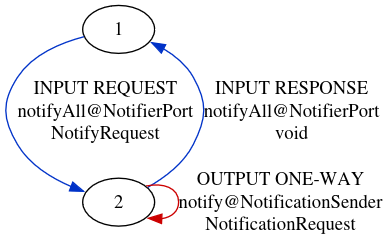
This Jolie service receives a notifyAll request containing a list of recipients, then iterates over them sending a one-way notification to each one via an external NotificationSender service. JolieGraph parses this code, traverses the AST, and builds the corresponding automaton — a compact graph capturing the loop and all communication primitives.
service NotifierService {
  inputPort NotifierPort {
    RequestResponse:
      notifyAll(NotifyRequest)(void)
  }
  outputPort NotificationSender {
    OneWay:
      notify(NotificationRequest)
  }
  main {
    notifyAll(request)() {
      for (recipient in request.recipients) {
        notify@NotificationSender({
          .recipient = recipient,
          .message = request.message
        })
      }
    }
  }
}
Generated graph: loop pattern
The generated automaton for NotifierService has just 2 states: state 1 receives the incoming request (INPUT REQUEST), transitions to state 2, which sends notifications in a self-loop (OUTPUT ONE-WAY). After the loop, the response is sent back (INPUT RESPONSE) and the service returns to the initial state. Edge colors encode direction: blue for input, red for output, green for branching.
Example: PaymentService
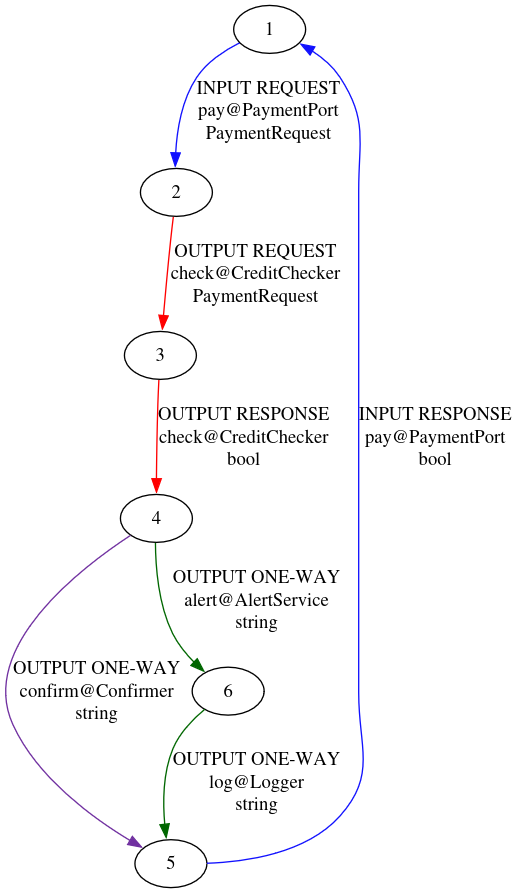
A more complex service: PaymentService receives a payment request, delegates a credit check to an external service (RequestResponse), and branches — if credit is sufficient, it confirms; otherwise it alerts and logs the failure. This demonstrates how JolieGraph handles conditional branching (if/else) and multiple output ports.
service PaymentService {
  inputPort PaymentPort {
    RequestResponse: pay(PaymentRequest)(bool)
  }
  outputPort CreditChecker {
    RequestResponse: check(PaymentRequest)(bool)
  }
  outputPort Confirmer { OneWay: confirm(string) }
  outputPort AlertService { OneWay: alert(string) }
  outputPort Logger { OneWay: log(string) }

  main {
    pay(req)(res) {
      check@CreditChecker(req)(res)
      if (enoughCredit) {
        confirm@Confirmer(req.userId)
      } else {
        alert@AlertService(req.userId)
        log@Logger("Payment failed for " + req.userId)
      }
    }
  }
}
Generated graph: branching pattern
The PaymentService automaton has 6 states. From state 1 (initial), it receives the pay request and delegates to CreditChecker. State 4 is the branching point: one edge goes to confirm (green, reaching state 6), another to alert+log (the else branch). Both paths converge to state 5, which sends the response back. The graph makes the communication architecture immediately visible — something impossible to grasp from code alone in large systems.
DOT output format
JolieGraph outputs standard DOT format (Graphviz), making it easy to render, embed, or process further. Each node represents an automaton state, and each edge is labeled with the communication type (INPUT/OUTPUT), the primitive (REQUEST, RESPONSE, ONE-WAY), the operation name, the target port, and the data type. The graphs can be rendered with any Graphviz-compatible tool.
strict digraph G {
  69 [ label="1" ];
  64 [ label="2" ];
  67 [ label="3" ];
  66 [ label="4" ];
  65 [ label="5" ];
  68 [ label="6" ];
  69 -> 64 [ label="INPUT REQUEST\npay@PaymentPort\nPaymentRequest" ];
  64 -> 67 [ label="OUTPUT REQUEST\ncheck@CreditChecker\nPaymentRequest" ];
  67 -> 66 [ label="OUTPUT RESPONSE\ncheck@CreditChecker\nbool" ];
  66 -> 65 [ label="OUTPUT ONE-WAY\nalert@AlertService\nstring" ];
  66 -> 68 [ label="OUTPUT ONE-WAY\nconfirm@Confirmer\nstring" ];
  65 -> 68 [ label="OUTPUT ONE-WAY\nlog@Logger\nstring" ];
  68 -> 69 [ label="INPUT RESPONSE\npay@PaymentPort\nbool" ];
}